New Toy-Thermaltake BlacX Duet eSATA Dual Dock
I received a Thermaltake BlacX Duet eSATA USB Dual Hard Drives Docking Station for Xmas. I’d asked for it since almost no non-nerd would have known what it was. Today was the first day that I got a chance to plug this baby in.
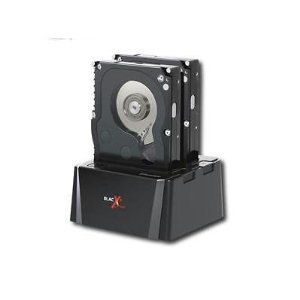
First Impressions
Comcast Limited-Basic TV
So I finally did it. I cut the TV lineup from 300+ channels to something called Limited Basic because they had a deal on ISP+TV for $30/month that I couldn’t refuse.
Last week, I dropped off all the equipment at the local Comcast office. What equipment?
- Motorola HD Tuner (not a DVR)
- ETA – phone to SIP converter
- DTA – weenie digital QAM tuner to lowest quality TV coax as possible
I had the triple-play from Comcast for the last 3 yrs. TV, Phone, and ISP. It was over $150/month; unlimited North American phone calls, 300+ TV channels, and a 12/3Mbps ISP connection. No real complaints except the price. For about $120 less, I have 22/5Mbps ISP, no phone, and the Limited-Basic TV which is supposed to be local channels, 5 shopping channels and 10 local access channels. I expected a single useful Spanish language channel – not the one I wanted. I’m certain the price will be higher than the $30/month promise due to local fees and taxes. How much higher is still to be answered.
Thankfully, I have an HD TV with a ClearQAM tuner. It used to get most cable channels from 2-118 – a little over 100 digital channels plus the 8 HD channels locally broadcast in my area. Since last May, most of those channels are encrypted. I get 2-27 analog with the DTV versions of those channels. No CNN, no TV-Guide, no USA, TNT, etc … still there are a few nice surprise channels – like Telemundo (Aurora), a few other Spanish channels and 3 HD PBS channels. I haven’t counted them all, but I think it is about 25 useful channels not counting any shopping or religious channels. I’m really pleased. OTA reception of HD where I live is hit or miss, so having cable access to those HD channels will be nice.
Ultimate OSS List-2010
Datamation has published their Ultimate Open Source Software List of 2010
Lots of good things in there for anyone that likes Open Source Software – OSS. Just to clarify, they seem to mix OSS, FLOSS and even some closed source things. More than a few in the 14 page article are not free and there are huge gaps in some of the categories where the best FLOSS tool is not mentioned at all.
The list has desktop and server software.
The list has trivial things like IM software and EBR software for medium-sized businesses.
There appear to be formatting errors in the article, so some of the lists aren’t split into new paragraphs, but those are fairly minor. The article is filled with jewels worthy of the 5 minutes to scan it for new stuff.
Related, I always perform a freshmeat query when looking for software to do X. There are thousands and thousands of FLOSS projects there.
SOGo-Competition for Zimbra and MS-Exchange 1
Messaging is easy, but Enterprise Calendaring is hard. I’ve just learned about the guys over at SOGo who have a GPL/LGPL competitor to Zimbra and MS-Exchange. Sure, you pay for support, but using the server software doesn’t cost anything.
- If you want to connect MS-Outlook clients, that’s fine.
- If you want to connect smart-phones, that’s fine.
- Thunderbird seems to be their main integration client, which is nice. That’s what I use.
Anyway, go take a look.
I’ve just pulled the VM appliance VMDK down and will be playing with it on ESXi in the next few weeks. They claim it was setup for VirtualBox, but I’d rather not run this sort of thing on that VM technology. This could be perfect timing for my company – we have been planning a Zimbra upgrade and honestly, it scares me.
There are lots of search hits on SOGo on freshmeat.net – that’s encouraging to me.
Check back here later. If SOGo is great, I’ll certainly write more. If it is crap, it will be in the comments below.
This could be good, really good. I’m hopeful.
Brother HL-2140 Laser Printer Tips 1
Tips consolidated from these posts.
Below are tips to get the most printing out of an inexpensive Brother laser printer, beyond what the default setup would provide. Users are reporting 500-1000 extra pages out of toner cartridges with these tips. I haven’t used the printer yet.
Gawker Media Password DB Stolen 2
Linux Related Presentation Ideas Needed 1
Last night I did a little presentation on Using VirtualBox on a Desktop. I’d give myself a D+ for a grade on the presentation. Fortunately, it was a small and highly interactive crowd. I tried to cover too much stuff. Also, I showed how to do this on a Windows host OS with a Linux client OS to a Linux-specific crowd. Initially, I’d planned to show an install on a Linux host OS too. The physical machine had a really slow disk controller, so I wasn’t able to create a virtual disk to install the OS into. I tried it a few weeks ago on the test machine and it took 45 minutes to create a 10GB .VDI file. On my home machines, doing this is just a few minutes.
The good thing was that I covered some of the key performance choices in virtualization – multiple times. The good news is that the newer VirtualBox releases choose most of these settings automatically. I should probably create a blog entry for each of the different client OSes that covers performance choices. Anyway …
Success with Linux For Non-Techies
Last week, I visited some relatives. Their computer running MS-WindowsXP had at least 1 rootkit installed and a number of viruses and spywares. This machine was running Firefox with NoScript (disabled) and Thunderbird for email. The main user is not very technical, but uses Firefox, Thunderbird, Quicken, and Investor’s Toolkit most days. I knew that solving the issue on Windows was going to be a problem again and again.
Linux to the rescue.