Enable Do Not Track in Firefox 4
Whether the Do Not Track settings have any legal support or not, it is worth enabling this for anyone who would like to tell websites not to track them. It may be a worthless effort, but thankfully, it doesn’t take much effort, so why not?
On my Linux system, running Firefox 4.0, the Tell web sites I do not want to be tracked setting, yes, that is the exact wording, is under the Advanced tab of the General tab in the Firefox Preferences.
Steps:
- Edit
- Preferences
- Advanced
- General
- then under the Browsing heading, check box to Tell web sites I do not want to be tracked
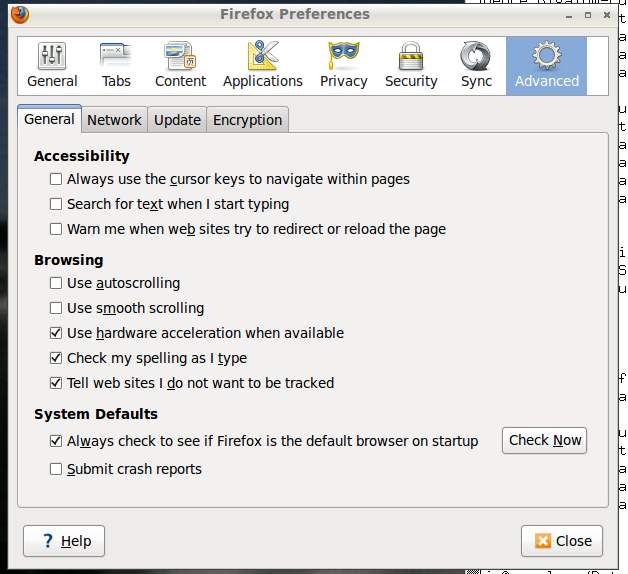
Simple.
On other operating systems, it should be easy to find.
Making KeePassX work with Pinentry and Enigmail 3
KeePassX is my password manager of choice.
Enigmail is the GnuPG signature and encryption add-on for Thunderbird.
Pinentry is used by Enigmail to enable secure entry of PINs, passwords and pass phrases. It blocks copy/paste and forces all keyboard entry into the pinentry textfield. That’s great if you have trivial or easily typed pass phrases. I do not.
These are all fantastic, until you depend on KeePassX to hold non-trivial pass phrases to gain access to your certificates. Since pinentry doesn’t allow copy/paste, there is a major issue. If your passphrase is non-trivial and long, then manually entering them whenever you need to read or send a sensitive email is beyond a hassle. It sucks. pinentry also grabs both the keyboard and copy/paste events, so you are probably unable to alt-tab to the window you really need. Anything typed on the system gets placed into the pinentry text field. How rude.
Workaround
There is a workaround – it is a hassle, but better than trying to type 50 characters of assorted keys.
Use the Perform Autotype option by mousing for your specific KeePassX entry. Doing this means that the Userid needs to be empty and you need to already have KeePassX unlocked before you begin any encryption work. Using the mouse to cause the paste/autotype works.
You’ll probably want to setup gpg-agent to hold your keys for a while too. Anything to avoid going through this crap to retype pass phrases for certificate access.
I’m running Enigmail v1.1.2, Pinentry-gtk2 v0.7.6 and Thunderbird v3.1.8.
101 Uses For a Password Manager
Ok, not really 101 uses for a Password Manager, but many more than you thought, about 30.
Use A Password Manager
For the last few years, I’ve been trying to get anyone with more than 5 passwords to remember to start using a password manager, PM, as part of increasing your desktop security. Below I’ll go into a few alternate uses for that password database beyond just storing computer and website passwords.
Options For Securely Sharing Files 1
In this Tax season, I find myself needing to share sensitive documents with relatively unsophisticated people and organizations. How should I share my files with them?
The Options
There are a few options to get those sensitive files to a provider. I will attempt to list the options, then describe the problems with each. Sadly, there aren’t any good solutions unless the service provider already has a solution setup. In my experience, be it an accountant, lawyer, doctor or shipping company, they do not.
- Encrypted Email with PGP or OpenPG or GnuPG
- Encrypted files, probably ZIPped attached to emails with a shared password
- Encrypted shared file service – perhaps Dropbox or sftp
- SSL Encrypted web portal with non-trivial userids and passwords
Sadly, there is no universal standard for sharing files, securely.
Nvidia GT 430 Install 2
I’ve been having issues with the X/Windows on the system that I’d like to use for a desktop. After trying different drivers and new drivers, I decided that the GeForce 7600 GS may not be up to the task. While getting a haircut, I looked across the street to see … Microcenter. It was loudly calling me to buy a new video card.
GPU Selection
I’d done some research and built a list of reasonable cards for consideration. $50 was my target price. Now I’m staring at a wall filled with nVidia and ATI cards. I really wanted a GT 440, but they didn’t have any in my price range. They did have hundreds of GT 430s – some in my price range and there was a $48 GeForce 9800 GT. This was ideal, but the GT 430 was intriguing. I needed to know more, so I asked the youngest guy there who looked like a nerd to help. He pulled up a GPU comparison website and was entering 9800/430. They were very comparable, the GT 430 was just a tad slower, but it used half the power and supported DirectX 11. Lots of thinking – ok, I’ll get it now and if the card appears to be crap when I perform my research at home, then I can return it. Research done. I’d gotten lucky with this card, especially for the $54AR price.
DHL Delivery Spam Email Getting Bad
The last few weeks my corporate email account has received about 10 of these messages every day with a ZIP file attached. The wording is reasonable for an English speaker, which is odd for spam. Usually the English is so poor as to not be an issue and is a clear sign of spam email. These DHL email are being caught at the server and put into the junk folder along with the get a doctorate degree spams.
Anyway, I’d like to warn everyone not to open these DHL emails or any ZIP attachments.
Why not?
- Did you provide DHL with your email address? I never have.
- Are you expecting a package? I’m not and 99.9% would NOT come from DHL.
Seems to me that DHL would know my name, address, and provide a package tracking number in all correspondences. These emails had none of that information – i.e. spam.
Dual Monitors-Remove nVidia and Use Nouveaux Driver
Many of you know that I’ve had stability issues with the proprietary nVidia video drivers for a few years. Lockups after just a few days, but especially when running any video applications like mplayer or VLC. This was new with Ubuntu and dual monitors. Previously I used the nVidia drivers on the same single monitor without any issues. Stability was good.
Failure – jump to the bottom to see why I undid use of the Nouveaux driver
A few months ago, I removed the X/Windows server from my main desktop and had it running only as a server – accessing it from remote systems or purely with the text/console interface.
I attempted to load the Nouveaux driver a few months ago, but never figured it out and life got in the way. Since removing X/Windows, the system stability has been impressive. ZERO lockups with Ubuntu Server x64 v10.04 LTS during that time, as you would expect.
This morning, I really needed the screen real estate that dual 24" monitors provide, so I started googling again and trying to get the Nouveaux driver installed so stability could be experienced/tested with it.
Easily Enter Unicode in Linux 1
Sometimes we all need enter non-ASCII characters for some reason. In Linux, it is fairly easy, provided you have access to a unicode table . There is nothing special about that unicode link – any of them should work.
The trick is to press “cntl+shift+u” as a cord followed by unicode keys for the specific character. For example, “00f1” will enter an “ñ” character. “ooe1” does “é”. Sometimes you don’t need to enter any leading zeros.
The main characters that I need are:
- 00e1 – á
- 00e9 – é
- 00ed – í
- 00f3 – ó
- 00fa – ú
- 00f1 – ñ
My needs are simple.
Firefox - Huge Memory Hog 4
I use Firefox with just a few extensions. Seven (7) are enabled right now. I have 3 tabs open, including the window I’m typing this article into.
So, why is Firefox using almost 1GB of RAM on my system?
  PID USER          PR  NI  VIRT  RES  SHR S %CPU %MEM    TIME+  COMMAND
30488 userid        20   0  973m 673m  26m S    9 33.5 445:22.42 firefox-bin
Seriously, I’d like to know. What could Firefox v3.6.13 be doing that needs more than 100MB of RAM? I see this happening almost every week.
What sort of memory use do you see with Firefox?
Schedule Jobs With AT
On UNIX/Linux operating systems, you can easily schedule jobs to be performed later with at. At is like cron, but more flexible for 1-time tasks to be run later.
echo "wget download-some-file-later" | at now + 1 dayThis command will take whatever the current time is and add 24 hours to it, then it will run the wget command provided. Time specifications are pretty easy to use. A few more examples:
echo "wget download-some-file-later" | at now + 2 months
echo "wget download-some-file-later" | at now + 1 year
echo "wget download-some-file-later" | at Friday
echo "wget download-some-file-later" | at Tuesday
echo "wget download-some-file-later" | at 6/1/11
echo "wget download-some-file-later" | at 5 pm 3/1/11